professional electronics design platform

Design the board. Write the firmware. See it work.

Unmild Designer brings PCB layout, embedded C/C++ development, microcontroller behavior, 3D verification, analysis, and manufacturing release into one serious Windows desktop workflow.

PCB + firmware Embedded C/C++ Windows desktop
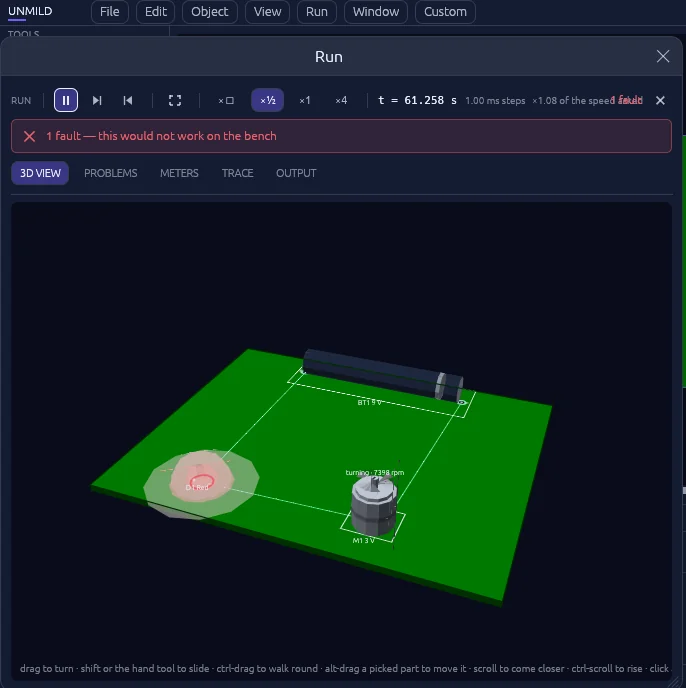
Unmild Designer's Run view showing a 3D board mid-simulation, a motor spinning at 7,398 RPM, and a flagged fault reading '1 fault — this would not work on the bench'.

live from Run — a motor at 7,398 rpm, one fault flagged

special features

Mool and Live 3D: the board, code, and behavior in one view.

Mool is Unmild Designer’s embedded-development environment. Write C or C++ against the microcontroller placed on your board, build it through your installed toolchain, create the required binary image, and watch the design respond in real time. Live 3D keeps the physical board visible while behavior, readings, and issues evolve.

  • Author embedded C/C++ in the same project as the PCB
  • Build firmware with your local compiler and generate board-ready binary output
  • Program the selected microcontroller and observe pins, behavior, readings, and faults alongside the 3D board
Explore Special Features
Unmild Designer with the Mool embedded firmware editor open for an ESP32, a C++ blink program visible, and the Run 3D behavior window alongside the PCB.
purpose-built desktop EDA

A serious workflow, from first trace to fabrication handoff.

Professional electronics work moves from intent to layout, firmware, behavior, verification, and release. Unmild Designer is organized around that complete decision path.

01

Design with control

Place parts, route copper, shape the board, use layers and grid snap, and tailor navigation, colors, keys, and panels to your working style.

02

Program in context

Use Mool to write embedded C/C++, build the selected target, program the microcontroller, and observe its behavior in the same design environment.

03

Release with confidence

Move from verified design to complete manufacturing output, documentation, review material, and release information without breaking the workflow.

Design, verify, run, export

One connected workflow for board design, embedded code, behavior, verification, and manufacturing.

Design

Place parts from the built-in library, route traces with the wire tool, and shape the board outline.

Verify

Review the board in 3D and run the current basic PCB DRC and schematic ERC checks before release.

Program

Write embedded C/C++ with Mool, build target-ready binaries through your local toolchain, and program the microcontroller in context.

Release

Generate the complete package for manufacturing, review, and handoff in one professional release workflow.

Review behavior where the board is being designed.

Run gives supported components a visible state on the board and reports concrete readings and problems. In this example, it identifies an LED current issue and suggests a series-resistor change — useful feedback while the layout is still open.

See 3D verification & Run
Unmild Designer's Problems panel reading: Fault D1. D1 is passing 841 mA, well past the 20 mA an ordinary LED survives. Put about 15.0 ohms in series with it.
The Summon parts picker in Unmild Designer, searching a battery holder library with CR2032, AA, 9V clip, and 18650 packages.

A parts library that comes when called

The component picker — internally named Saad, Sanskrit for "to call" — searches by part, value, or package and drops it wherever you click. No hunting through nested menus mid-layout.

  • Search across resistors, capacitors, inductors, diodes, LEDs, batteries, and more
  • Filter by value and package before you place a single part
  • Keep summoning the same part, or switch and stay in flow
A grid of PCB boards laid out in Unmild Designer, showing Board 1 through Board 35 of a project supporting up to 1,000 boards.

A workspace that adapts to you

Unmild Designer is designed to stay out of the way. Make panels float or dock, tune zoom and pan behavior, point zoom to the cursor, save navigation presets, and remap command keys.

  • Customize zoom animation, zoom, horizontal and vertical pan, and hand-tool sensitivity
  • Save navigation presets, retain custom colors, and restore the workspace you prefer
A file explorer showing Unmild Designer's export output: Gerber files, drill files, BOM, pick-and-place, stackup, fabrication manifest, and README.

Release manufacturing data with confidence

Generate manufacturing artwork, drill data, bill of materials, placement information, stackup, review drawings, release notes, and a fabrication manifest together—built for a clean handoff from design to production.

See the full export list

One platform for the board and the code that brings it to life

Unmild Designer connects physical design with embedded firmware. Lay out the board, write C/C++ in Mool, program the microcontroller, watch the behavior, then release the complete design package. Discover the platform →

Questions people ask first

What is Unmild Designer?

A professional Windows electronics platform for PCB layout, embedded firmware, microcontroller behavior, 3D verification, analysis, and manufacturing release.

What file format does it use?

Projects are saved as .tamas files inside a project folder. Exporting adds a build folder alongside it holding the fabrication output.

What does Run actually simulate?

Run is the live board-behavior environment. It shows component state, readings, and issues in the context of the PCB, while Mool lets embedded C/C++ code program the microcontroller that drives the design.

What do I get when I export?

One export creates a complete release package: manufacturing artwork, drill data, bill of materials, placement information, stackup, review documentation, and fabrication information.

Is Unmild Designer free?

It is available through the Microsoft Store. View Unmild Designer on Microsoft Store.

Who builds Unmild Designer?

Unmild Designer is a professional electronics design platform for PCB, firmware, verification, and manufacturing. More about the platform.

get unmild designer

Route it, watch it run, then send it to fab.

Download Unmild Designer from the Microsoft Store and start designing, verifying, and exporting in one desktop workflow.